
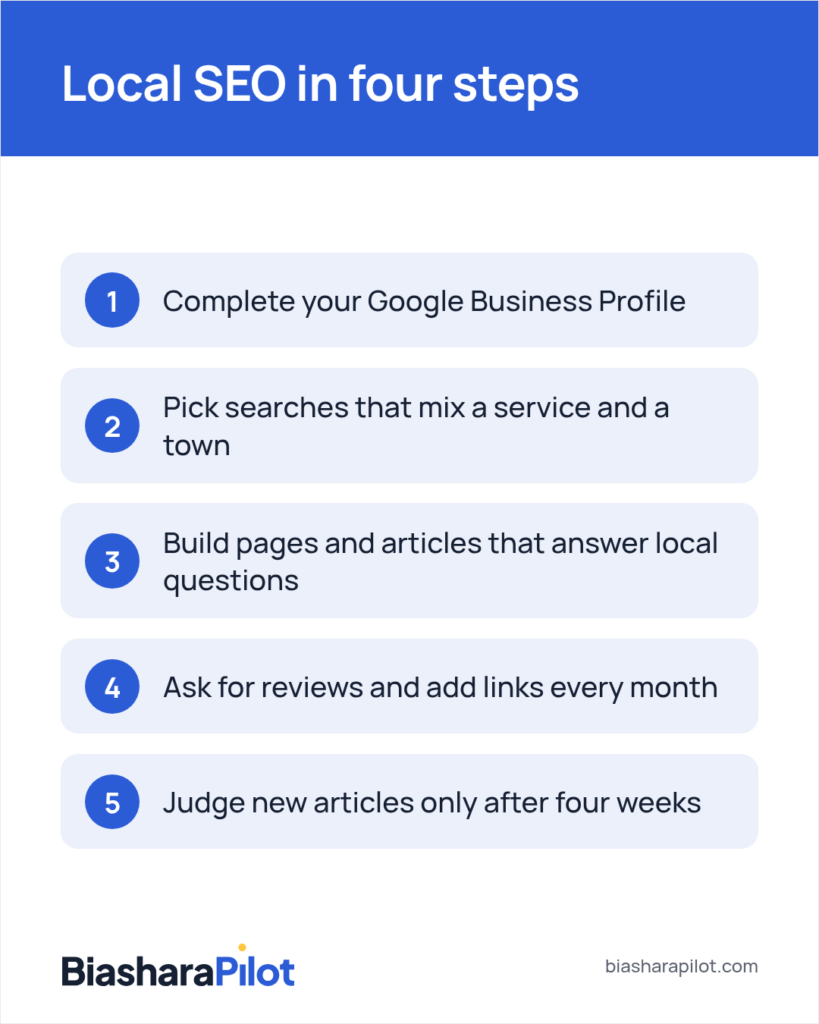
In short: Start with your Google Business Profile, then pick a few searches that mix your service and town, build pages that answer them, and ask for reviews. Repeat it monthly; local SEO builds over months, not days.
Key takeaways
- Your Google Business Profile fills the map pack and can't break your website, so fix it first.
- Pick three to five searches that pair a service you profit from with a town you serve.
- Link every article to the service page it relates to, so readers and Google reach the pages that earn.
- Leave a new article four weeks before you judge it, because an article younger than that isn't judged yet.
- With BiasharaPilot, nothing goes live until you approve it, and every change has an Undo.
You know people near you search Google for what you do, and some of them call someone else. Local SEO comes down to a short order of jobs you can do yourself, starting with the free profile Google already shows for your business.
The work builds over months, not days. The upside is that a finished profile, a good page or a fresh review can keep helping nearby customers find you after the work is done.
By the end, you’ll know what to fix first, what to do each month, and whether to do it by hand, with a tool, or with help.
What does SEO for a local business mean?
Local SEO is making your business easy for people nearby to find on Google Search and Google Maps. When someone types “plumber near me” or “water heater repair Columbus”, Google tries to show businesses that are close, relevant and trusted.
That’s what you’re working toward: being one of the names on the screen when a person in your area needs what you do.
How is local SEO different from general SEO?
Many business owners we speak to picture SEO as a contest with the whole internet. It’s an understandable picture, because most guides are written for websites chasing visitors from every state.
Local SEO is a smaller, closer contest. You aren’t up against every business like yours in America, only the ones a searcher in your area could call today.
Google also reads different signals for local searches. Alongside your website, it looks at your Google Business Profile, how far you are from the searcher, your reviews, and whether your name, address and phone number match across the web.
Where local results show up on Google
For most local searches, Google puts a map near the top with three businesses under it. People in the trade call this the map pack.
Below it come the ordinary results, the blue links to websites. Your profile mostly earns your place on the map, your website mostly earns the links, and each one helps the other.
Say you run a small plumbing company in Columbus, Ohio, serving the city and suburbs like Dublin and Westerville. Most of your profit comes from water heater installs and emergency call-outs, so success looks like your name in the map pack and on page one when someone nearby searches for either.
Step 1: Set up and complete your Google Business Profile
Start here, because the profile is what fills the map pack. It also lives on Google, not on your website, so nothing you change here can break your site.
Claim and verify your profile
Go to business.google.com and search for your business name. If a listing already exists, claim it; if not, create one.
Google then asks you to prove you own the business, by a phone call, an email, a postcard or a short video of your premises and tools. Take whatever it offers and finish it that week, because an unverified profile can’t do much for you.
What goes wrong most often is a second listing for the same business, made years ago by a past employee or by Google itself. Search Maps for your phone number as well as your name, and if you find a copy, ask Google support to merge or remove it.
If you work at your customers’ homes and don’t want your address shown, set yourself up as a service-area business. You list the towns or ZIP codes you cover, and the street address stays hidden.
Choose your categories
Your primary category tells Google what you are, and it carries more weight than anything else you pick. Choose the one a customer would use: “Plumber”, not “Contractor”.
Then add a few secondary categories that match real work, such as “Water heater installation service” or “Drainage service”. Leave out anything you don’t do, because a category that doesn’t fit brings calls you’ll have to turn away.
Fill in hours, services, description and photos
Add your hours, including holiday hours. A searcher who sees you marked “Open” and gets no answer on Thanksgiving morning is unlikely to try you again.
List each service in the services section, in the words your customers use. Write a short description of what you do and where, the way you’d say it on the phone.
Add photos of your real work: your van, your team, a finished install, the inside of your shop if you have one. Stock photos tell a searcher nothing, while your own show them who’s coming to their door.
What you should see when you’re done is a listing on Maps that answers a stranger’s first questions: what you do, where, when you’re open, and how to reach you.
Keep your name, address and phone the same everywhere
Google checks your details against other sites, such as Yelp, Apple Maps, Bing Places, Facebook, the Better Business Bureau and local directories. When they match, Google can be more confident your details are right.
Write your name, address and phone exactly as they appear on your profile, and use that version everywhere. Then check the main sites one by one and fix any old phone number or past address.
A mistake we see often is adding search words to the business name, like “Smith Plumbing Best Emergency Plumber Columbus”. It breaks Google’s rules and can get the profile suspended, so use the name on your sign and your paperwork.
Step 2: Find the searches your local customers use
Next, pick a few searches to work on. A good local search mixes the service and the place: “water heater installation Columbus”, “emergency plumber Westerville”, “drain cleaning Dublin Ohio”.
Write down the searches that bring you profit
Start from the jobs that make you money, not the ones you do most. For the Columbus plumber, that’s water heaters and emergency call-outs, so those come first.
For each job, write the words a customer would type, paired with the towns you serve. Then add the questions people ask you on the phone, such as “how long does a water heater last”, because those become articles in Step 3.
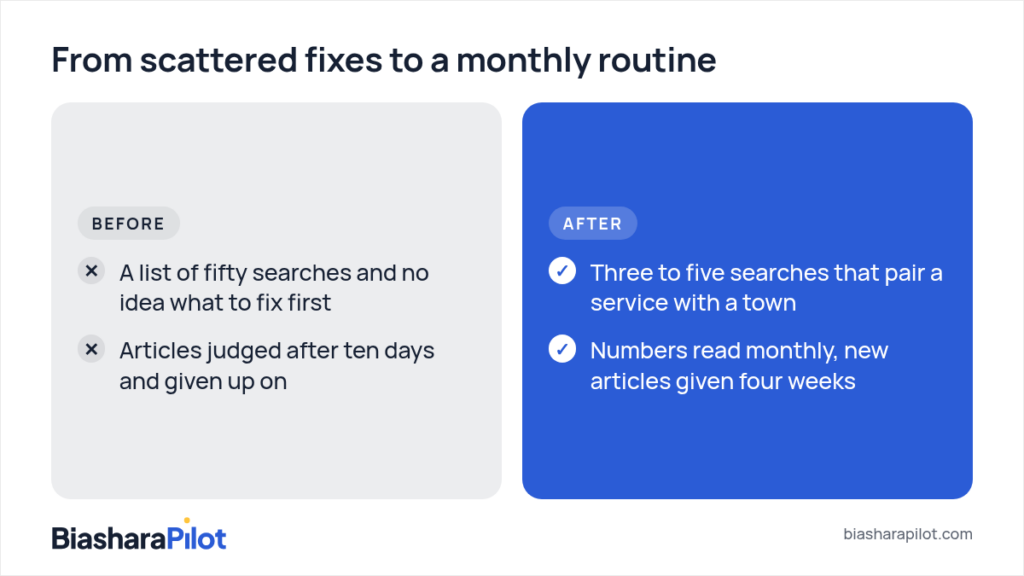
Keep your first list to three to five searches. What goes wrong most often is a list of fifty, which spreads your time so thin that nothing moves.
Check who’s on page one
Search each phrase on your phone while you’re out in your service area. Local results change with where the searcher stands, so a search from your office can look different from one across town.
Note who’s in the map pack and who holds the first few blue links. Open their profiles and look at how many reviews they have, how recent those are, which categories they use and what photos they show.
What you should see is a pattern. If the map pack is full of businesses with many reviews and good photos, your profile and reviews are the work; if page one is full of big directories like Yelp or Angi, a strong service page of your own can stand out among them.
Spot where you’re already close
Set up Google Search Console if you haven’t yet. It’s a free Google tool that shows which searches your website already appears for, and at what position.
Look for searches where you sit at positions 8 to 20, the bottom of page one or the top of page two. These are often the quickest to move, because Google already sees your page as a fair answer.
Say Search Console shows your water heater page near the bottom of page one for “water heater replacement Columbus”. That search becomes your first focus, ahead of any search you don’t show up for at all.
If you’re still weighing where your first hours should go, our guide to SEO for small business and where to start covers the choices that come before any of this.
Step 3: Build pages and articles that answer local questions
With your searches chosen, give each one a page that answers it well. For a local business, three kinds of page do most of the work.
Service pages: one for each job that earns
Give every main service its own page, rather than one page that lists everything. A page about water heater installation can say who it’s for, what the job involves, which kinds you fit, how long it takes, and how to book.
These are the pages that make you money, so they come first. Put your phone number and a booking button near the top, where someone with a burst pipe can find them in a second.
What you should see on each page is the search words in the heading and the first lines, said naturally. A reader should know within a few seconds that you do this job, in their town.
Location pages for the towns you serve
If you cover several towns, a page for each can help you show up for searches that name them. Each page needs something real about that place: the neighbourhoods you cover, the kind of homes there, the jobs you often do, a photo from a job in town.
What goes wrong most often is the same page copied twenty times with only the town name swapped. Google tends to ignore pages like that, so build them only for towns you truly serve and can say something about.
Articles written from what you know
Articles answer the questions customers ask before they’re ready to book. “Why is my water heater making a popping noise?” and “Tank or tankless for a family of four?” are searches people make, and you answer them on the phone every week.
That knowledge is what makes your articles worth reading. A generic article could come from anywhere, but you can tell a homeowner what you see in the basements you visit and what it costs them to wait.
We understand that writing feels like a second job when you’re already running a business. But you don’t need a blank page: record a voice note answering one customer question while you drive between jobs, then turn it into an article or ask someone to tidy it.
Link each article to the page that earns
Every article should point to the service page it relates to, with the link on words that name that service. The popping-noise article links the words “water heater repair” to your repair page.
These links inside your own site are called internal links. They show Google which pages matter most, and they give the reader a next step once they have their answer.
A month of content, planned
Here’s what one month could look like for the Columbus plumber, built from the searches in Step 2:
| Week | What to publish | Links to |
| 1 | Improve the water heater replacement page (your first-focus search) | Booking page |
| 2 | Article: Why is my water heater making a popping noise? | Water heater repair page |
| 3 | Location page: plumber in Westerville | Emergency plumbing page |
| 4 | Article: Tank or tankless for a family of four? | Water heater installation page |
Four pieces a month is a lot for one person, so set the pace you can keep. One good piece a month, kept up all year, tends to do more than four in January and nothing after.

Step 4: Reviews, links and a monthly routine you can keep
The first three steps set things up. This step is what you repeat, and it’s where steady results come from.
Ask for reviews after completed jobs
Reviews help your place in the map pack, and they’re often what a searcher reads before choosing between three names. Ask customers in person after completed jobs, without choosing only those who seem pleased.
Then send the link the same day by text or email. Your Google Business Profile gives you a short review link you can copy and keep on your phone.
Reply to every review, good or bad, briefly and politely. A calm reply to a complaint shows the next reader how you treat people when something goes wrong.
What goes wrong most often is offering a discount for a review. Google’s rules don’t allow it and such reviews can be removed, so ask without a reward.
Add links inside your site and from your town
Each month, add links from your newer articles to your service pages, and from older articles to the new ones. Put each link on words already in the sentence, so your writing still reads the way you wrote it.
Links from local places help too: your chamber of commerce, a supplier’s page listing installers, a youth team you sponsor, a story in the local paper. A link from a relevant local group can be more useful than links from unrelated sites.
Read a short report once a month
Once a month, open Search Console and your profile’s performance screen. In Search Console, check your clicks, which searches showed you, and your position for the three to five searches you picked.
Your profile shows calls, website visits and direction requests from the listing. Write these numbers in a simple sheet so you can compare one month with the next.
How long does local SEO take?
We understand you may have heard big promises before, and waiting is hard when you’re paying for it with your evenings. Fixes to your profile can show within weeks, while pages and articles tend to build over months as Google finds them, tests them and starts to trust them.
So don’t judge an article in its first four weeks. A page that looks quiet at day ten hasn’t been judged yet, and our report doesn’t judge it either until it is four weeks old.
Nobody can promise you a ranking or a date. What we can give is advice: steady local work tends to build, and your monthly numbers show you whether it’s moving.
Check whether AI assistants name you
Some customers now ask ChatGPT, Claude, Gemini or Perplexity for a local recommendation instead of searching. Once a month, ask each one the questions your customers ask, such as “who’s a good plumber for a water heater in Columbus?”, and note whether your name comes up.
These assistants draw on what’s written about businesses across the web. A full profile, clear service pages, reviews and local mentions can also help these assistants find information about you.
A monthly routine for a busy owner
Spread over a month, the routine fits around a full working week:
- On the first of the month: read last month’s numbers and write them in your sheet.
- Week one: pick the month’s focus, one search from your list, and the page or article that serves it.
- Week two: publish that page or article and link it to the service page it supports.
- Every week: ask for reviews after completed jobs and reply to new ones.
- Week four: add a few new photos to your profile, check your hours, and ask the AI assistants your customers’ questions.
When time is short, keep the reviews and the monthly numbers, and let the article wait a month. Those two keep you moving and show you where you stand.
Your local SEO checklist
- Claim and verify your Google Business Profile.
- Choose a primary category that matches your main paid work.
- Add hours, holiday hours, services, a description and your own photos.
- Make your name, address and phone match on every directory.
- Pick three to five searches that mix a service and a town.
- Build or improve one page for each service that earns.
- Write one article a month from a question customers ask.
- Link every article to the service page it relates to.
- Ask for a review after completed jobs, and reply to each one.
- Check your clicks, searches and positions once a month.
- Leave new articles four weeks before you judge them.
- Ask AI assistants your customers’ questions once a month.
Doing it yourself, with a tool that waits for your approval
You now have the whole order of work. What’s left is choosing who does it each month: you, a tool, or someone you hire.
Doing local SEO by hand
Everything above can be done with free tools and your own time. It suits you if you can protect a few hours a month and you like seeing how each part works.
The cost is your time, and the risk is the busy month, then the next one. Plans often stop there, not because the steps are hard, but because nothing reminds you to come back to them.
Hiring help, and what to pay for it
An agency or freelancer takes the work off your hands. Weigh what you pay against the profit the work could bring you, not your takings.
For example, say each water heater install leaves you $400 profit after parts and labour. If help costs you $800 a month, you need two extra installs a month from search to break even, and more before you come out ahead.
If you’d rather have a team do it, Managed SEO from AM Digital KE runs the same system as BiasharaPilot, with our team reading every article, improving pages and meeting you every month. It’s sold on amdigitalke.com.
Using a tool that keeps you in charge
A tool sits between the two: it does the repeat work, and you make the calls. That’s why we built BiasharaPilot, run by AM Digital KE in Nairobi, Kenya.
Our founder, Alvin, has spent ten years in SEO for agencies, media houses, ad companies, startups and WordPress companies. He’s also run his own businesses and hired others to do this work, so he knows both sides of the desk.
In your studio, BiasharaPilot follows the same six steps every month: connect, read the site, plan, draft, publish, report. It reads your site, builds the plan, drafts articles in your voice, adds links and sends your report.
Nothing goes live until you approve it
Every draft waits for you. What you approve goes on your site within a few minutes, and the plugin keeps a list of every change with an Undo on each, so you can take back anything it put there.
You don’t need to be an SEO expert to approve a draft. You know your business, and that’s what each draft needs checking against.
Links are added every week, each on words already on your page, so your sentences stay yours. Every figure in an article shows its source, so you can check it before you approve.
A report that shows what moved
The monthly report arrives on the first of the month and takes about five minutes to read. It counts clicks, searches and positions on Google, and it doesn’t judge an article younger than four weeks.
Once a month it also asks ChatGPT, Claude, Gemini and Perplexity your customers’ questions and checks whether they name your business. When you want to talk through your numbers or the plan, Rubani, your SEO and strategy partner, answers from your own figures.
It connects to WordPress and Next.js sites today. It doesn’t count customers or sales, and it doesn’t promise rankings or a date for results; it keeps the steady work going and leaves each decision with you.
What to do now if the tool isn’t open yet
Early access is opening in waves, starting with the first people on the list, and the price is set at launch. Joining doesn’t commit you to anything.
You don’t need to wait to start. If you have one hour this week, spend it on Step 1: your categories, your hours, your services and five photos of your own work.
Then take the checklist one line at a time, a line or two a week. By the time your wave opens, the groundwork is done and the plan has something solid to build on.
Frequently asked questions
Does local SEO still work?
Yes. People still search Google and Maps when they need a plumber, a dentist or a florist nearby, and Google still chooses which local businesses to show them.
What has grown is the number of places a customer might ask, including AI assistants. The groundwork for both is a complete profile, clear pages about your services and towns, and reviews from real customers.
Can AI tools help with SEO for a small business?
They can, as long as you stay the one who decides. A good tool can read your site, suggest a plan, draft articles and add links, which takes the hours off your week.
The risk is a tool that publishes generic text without asking you, because generic pages don’t win local customers. Our guide to what an AI SEO tool is and how to choose one covers what to look for before you connect one to your site.
Your first step this week
Open your Google Business Profile today and check your primary category, your hours and your photos. It’s the one step that can’t touch your website, and it’s where the map pack starts.
When you’re ready to hand the monthly work to a plan that waits for your approval, join BiasharaPilot early access. You’ll be in line for the first waves, and you stay in charge of every change.